Published Date: November 10, 2025
Written By:Siddharth Pandya
Why does one laptop feel fast and easy to use while another feels slow and frustrating? The hardware matters, but the programs you open each day often make the bigger difference. Application software decides how smoothly a report gets written, how quickly a photo gets edited, and how well a team stays in sync.
Those differences add up. Even saving 10 minutes a day can add up. Across 250 working days, that is around 42 hours saved in a year. The right application software helps people complete everyday tasks more efficiently, whether they are working, studying, or managing personal activities. Businesses can also work with a software development company to build tools around their own processes.
This guide covers the features, functions, purpose, benefits, and importance of application software, so you can choose and use it with confidence.
What is Application Software?
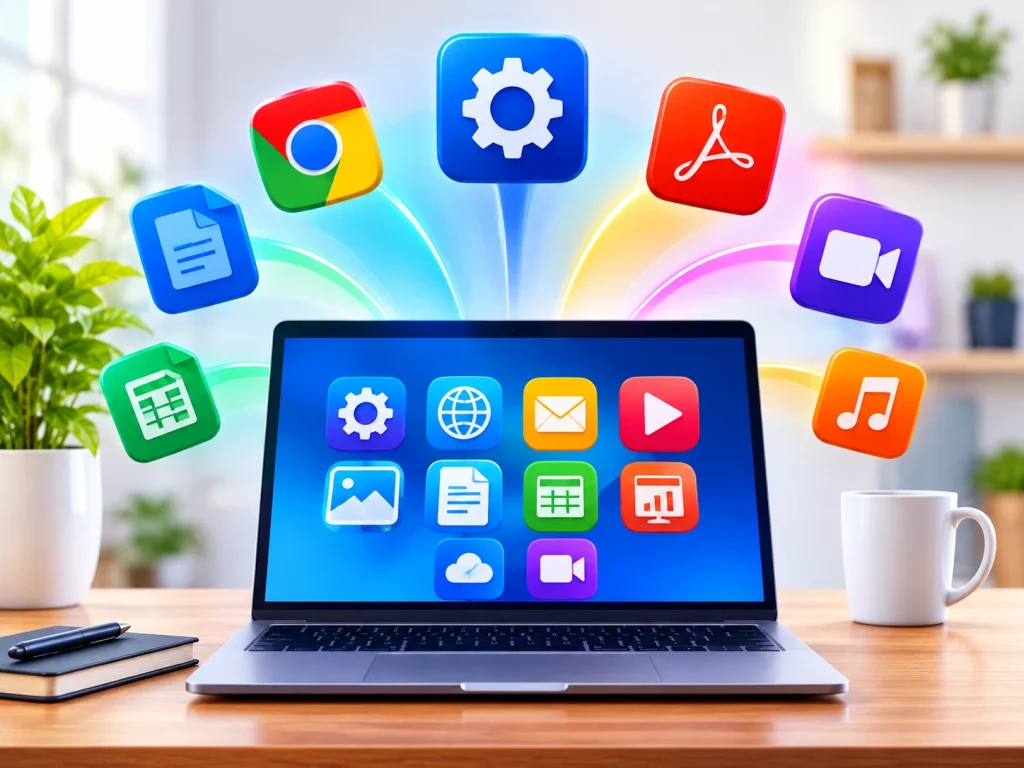
In simple terms, application software is a program designed to do a particular job for end users, such as writing a document, editing a photo, or joining a video call. It is the software people open and use directly to get something done. System software, such as an operating system, works behind the scenes. It controls the computer’s basic operations, including memory, storage, and connected devices. Application software relies on that foundation, so the two work together every time you use a computer.
For instance, Microsoft Word helps you write and edit documents, Photoshop supports graphic design, and Zoom supports video meetings. Each of these tools is built for a particular user need. Businesses can create similar purpose-built tools by working with software developers who build applications around specific workflows.
The Purpose of Application Software
The main purpose of application software is to make everyday activities easier and help people achieve specific goals. It provides tools that simplify tasks, reduce manual effort, and make technology more useful in personal, educational, and professional settings.
People use application software for different reasons, such as:
- Saving Time: Completing activities more quickly and reducing manual work.
- Improving Productivity: Helping users stay organized and manage their responsibilities.
- Supporting Learning: Providing access to educational resources and digital learning tools.
- Simplifying Daily Activities: Making tasks such as shopping, banking, booking services, and entertainment more convenient.
Key Features of Application Software
The features of application software are built around ease of use and task performance. The main features are:
- Specific Functionality: Applications are designed to perform specific tasks or support a group of related activities, such as editing photos, managing data, or holding video meetings.
- User Interface (UI): Simple layouts make applications easy to use, even for people who do not write code.
- Customization: Many applications let users change settings, layouts or features to fit their needs.
- Connectivity: Applications can connect with other apps and cloud platforms for better collaboration.
- Portability: Many applications are available across multiple devices, including desktops, laptops, and mobile phones.
- Regular Updates: Developers improve functionality, security, and performance over time.
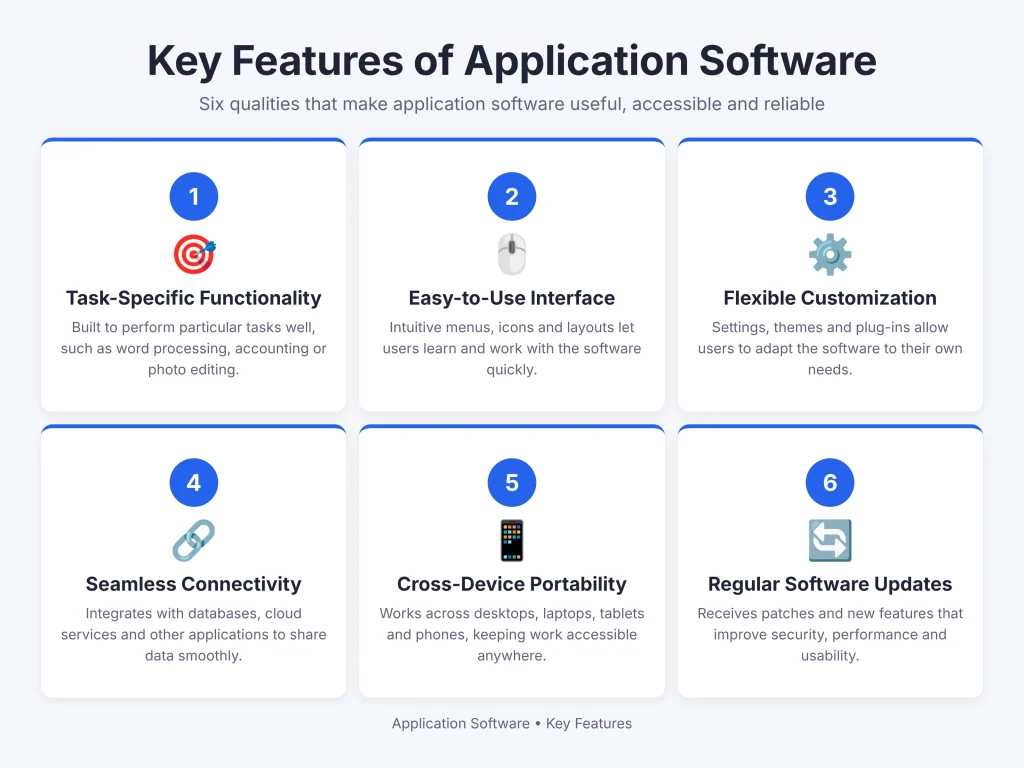
These features are why application software is useful to both individuals and organizations.
Functions of Application Software
The functions of application software show how it simplifies work and daily life:
- Data Processing: Programs such as Excel process large volumes of data, run calculations, and create reports.
- Information Management: Apps help you store, sort, and find important information.
- Communication: From Gmail to WhatsApp, apps connect people instantly.
- Decision Making: Business analytics software helps companies understand data and make better business decisions.
- Automation: Applications handle repetitive tasks so people can focus on other work.
- Entertainment: Media players and games provide entertainment and engagement.
Types of Application Software
Application software can be classified in different ways, including the tasks it performs and the license under which it is distributed.
| Type | What it does | Common examples |
| Word processing | Creates, edits, and formats documents | Microsoft Word, Google Docs |
| Spreadsheet | Stores, calculates, and analyzes numbers | Microsoft Excel, Google Sheets |
| Presentation | Builds slides with text, images, and media | PowerPoint, Google Slides, Keynote |
| Web browser | Opens and displays websites | Chrome, Firefox, Safari |
| Multimedia | Plays, records, or edits audio and video | VLC, Audacity, Adobe Premiere Pro |
| Graphics and design | Creates and edits images and layouts | Adobe Photoshop, Canva |
| Communication | Supports messaging, email, and video calls | Slack, Zoom, Outlook |
| Project management | Plans tasks, timelines, and team work | Asana, Trello, Microsoft Project |
| Database Software | Stores, organizes, and manages large amounts of data | Airtable, Microsoft Access |
Based on licensing and distribution, application software can also be classified as freeware, shareware, open-source software, and proprietary software. Freeware is available to use without a purchase fee, while shareware is commonly offered as a trial or limited version. Open-source software allows users to inspect and modify its source code under its license terms. Proprietary software is owned and distributed under the terms set by its vendor. These categories can overlap; for example, open-source software can also be free to use.
Types of Application Software Based on Device Used
Application software can run in different ways depending on how it is installed, accessed, and managed. Some applications run directly on computers, while others work through web browsers or cloud platforms.
| Type | Where it runs | Key features | Common examples |
| Desktop Software | Installed on computers running Windows, macOS, or Linux. | Installed on a computer and can offer strong performance and offline functionality, depending on the application. | Microsoft Word (desktop), Adobe Photoshop, AutoCAD |
| Web Applications | Accessed through web browsers such as Chrome, Firefox, or Safari. | Usually do not require installation and can be accessed from different devices. Some also support offline features. | Google Docs, Canva, Figma |
| Mobile Applications | Installed on smartphones and tablets. | Designed for mobile screens and can use device features such as cameras, GPS, and notifications. | WhatsApp, Instagram, Uber |
| Cloud-Based Software (SaaS) | Hosted on cloud servers and accessed through the internet. | Offers remote access, automatic updates, and subscription-based plans. | Salesforce, Slack, Microsoft 365 |
| Enterprise Software | Deployed across an organization’s departments and business operations. | Helps manage large-scale activities, connect departments, and control business processes. | SAP, Oracle ERP, Microsoft Dynamics 365 |
Each type serves different needs. The right choice depends on how you plan to use the application, the devices you work with, and the requirements of your business.
General-Purpose vs Specific-Purpose vs Custom Software
Application software can be designed for everyday tasks, specific jobs, or the unique needs of a business. Here is how these three types differ.
- General-purpose software: It is designed for everyday tasks that many people perform. It can be used for different activities, such as writing documents, creating spreadsheets, browsing websites, and sending emails. Microsoft Word, Excel, and Google Chrome are common examples.
- Specific-purpose software: It is developed to perform a particular type of task or serve a specific industry. For example, payroll software helps businesses calculate employee salaries, while airline booking software manages flight reservations. These applications focus on doing one job efficiently.
- Custom software: It is developed specifically for one business based on its unique requirements. For example, a wholesaler may need software to manage dealer-specific price lists, product rates, discounts, order quantities, and payment terms in one place. Unlike ready-made applications, custom software is built around the company’s existing workflows.
Many businesses use general-purpose and specific-purpose applications for daily operations. However, when these tools cannot meet their requirements, custom software can provide a more suitable solution. If your business needs software designed around its processes, talk to our custom software development team.
When Should a Business Build Custom Application Software?
Ready-made software works well for many businesses. But as a business grows, its needs can change. Sometimes, standard tools no longer support the way your team works. Here are five signs that your business may need custom application software.
- Your business has unique workflows. Let’s say you run a furniture workshop where every order is made to a specific size. Each order involves several steps, including quotation, design approval, cutting, and delivery. A standard tool may not support all these steps, forcing your team to use spreadsheets and notes. Custom software can manage the entire process, from the first quotation to final delivery. An AI copilot can also help answer customer questions about product sizes, designs, pricing, and order status.
- Your existing tools don’t work together. Imagine running a distribution business with separate tools for inventory, accounting, and deliveries. Your team has to move information between these systems every day, which takes time and can lead to mistakes. Custom integration can automatically share stock details, invoices, and delivery updates. Custom API integrations can help connect these tools, while an ERP system can bring finance, inventory, and other business operations together.
- Software costs increase as your team grows. Think about a sales team of five people using software with a monthly fee for each user. When the team grows to 50 people, the cost increases significantly. A custom CRM may require a higher initial investment, but it can reduce dependence on per-user licensing fees. Whether it saves money over time depends on development, hosting, maintenance, and upgrade costs. Read our guide on custom CRM development cost to compare your options.
- You want more control over your business data. Consider a transport company that stores driver details, route history, and delivery records on a third-party platform. Moving this data to another system can be difficult and time-consuming. With custom software, you can have greater control over data storage, access permissions, and how your business information is managed, depending on your hosting and ownership arrangements. Our logistics software development service helps businesses build solutions around their needs. Explore our Liftor case study to see an example.
- Your business process gives you a competitive advantage. Imagine a distributor that offers different prices and credit limits to dealers based on their order volume and business relationship. Standard software may not support these rules, forcing the sales team to manage them manually. Custom software can handle these specific requirements and support your business processes. Our CRM for distributors is designed for such needs. Explore our case studies to see more of our work.
If any of these challenges affect your business, it may be worth evaluating whether custom software is the right solution.
Not sure if custom software is right for your business?
Talk to our custom software development team. We’ll look at how your team works and tell you honestly whether a ready-made tool would do the job.
Examples and Uses of Application Software
Application software is part of many activities people carry out throughout the day. It helps individuals manage personal tasks, students complete their studies, and businesses serve their customers. Here are some common examples of how people use it:
- At Work: Employees use applications to prepare reports, review information, manage schedules, and coordinate with their teams. These tools make it easier to handle daily responsibilities and keep work organized.
- In Education: Students and teachers use digital learning platforms to attend online classes, access study materials, submit assignments, and track academic progress.
- In Banking and Finance: Banking applications allow users to check account balances, transfer money, pay bills, and review transactions without visiting a bank.
- In Shopping and Travel: E-commerce and travel applications help people compare products, place orders, book tickets, reserve hotels, and track deliveries.
- In Healthcare: Healthcare applications help patients book appointments, access medical reports, receive reminders, and communicate with healthcare providers.
- In Personal Communication: People use applications such as WhatsApp and Zoom to stay connected with family, friends, colleagues, and customers.
- In Business Operations: Companies use software to manage sales, monitor inventory, maintain customer records, track orders, and review business performance. They can also develop customer-facing solutions with a mobile app development company.
These examples show how application software supports different needs, from simple personal activities to complex business operations. The applications people choose depend on their goals, the tasks they need to complete, and the features they require.
Benefits and Advantages of Application Software
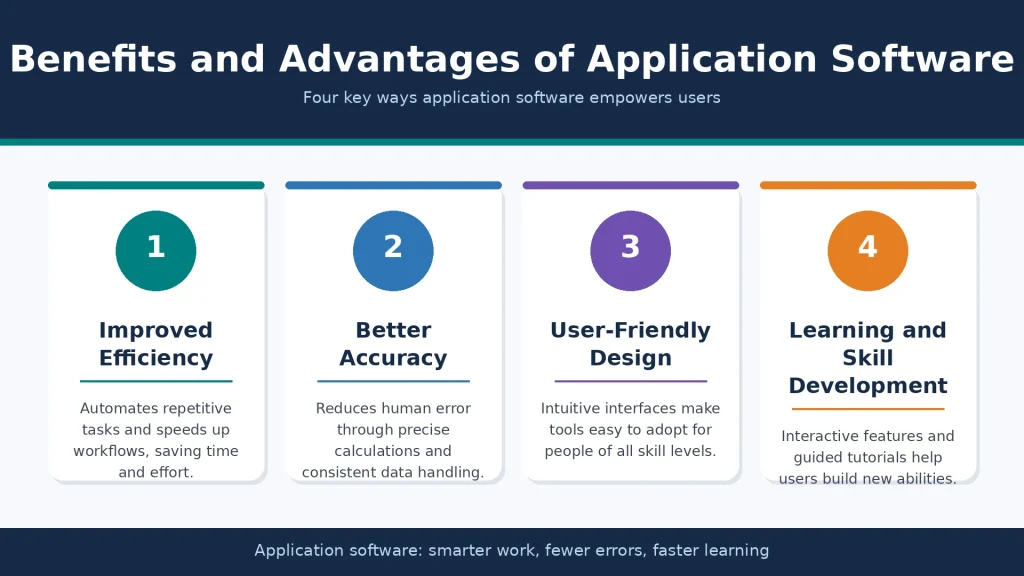
Application software makes everyday tasks easier by helping users work faster, stay organized, and complete activities with less effort. Here are some of the benefits of application software:
- Improved Efficiency: Application software helps users complete tasks in less time. For example, spreadsheet tools can organize large amounts of data and perform calculations much faster than doing them manually.
- Better Accuracy: Applications reduce the chances of human error in tasks such as calculations, record keeping, and data entry. This helps users maintain more reliable information.
- User-Friendly Design: Most applications have clear menus, buttons, and instructions that make them easier to understand and operate, even for people with limited technical knowledge.
- Learning and Skill Development: Educational and professional applications provide resources that help users develop new skills and improve their knowledge.
The Trade-offs
Application software has downsides too. Licenses and subscriptions add up, especially for small teams. Software that is not updated regularly can leave security gaps, and apps that collect personal data raise privacy concerns. Some tools do not work well with other systems, and moving away from one vendor can be difficult. Advanced applications may require training, and users may take some time to become comfortable with their features. Choose software for the features you need, not for the longest feature list.
System Software vs Application Software
System software and application software serve different purposes on a computer.
| Point | System software | Application software |
| Main purpose | Manages computer hardware and basic operations | Helps users perform specific tasks |
| Main role | Provides the platform for applications to run | Provides tools for work, communication, learning, and entertainment |
| User interaction | Often runs in the background, but some system tools have user interfaces | Usually designed for direct interaction with users |
| Examples | Windows, macOS, Linux, device drivers | Word, Excel, Chrome, WhatsApp |
Utility software, such as antivirus programs and disk cleaners, helps maintain and protect a computer. It is generally considered part of system software. Programming tools, such as compilers and code editors, are another software category.
As a rule of thumb, if a program helps you complete a task of your own, such as writing, calculating, or messaging, it is application software. If its main job is to manage or maintain the device, it is system software, even when you open it yourself, like a file manager or antivirus tool.
Importance of Software in Everyday Life
The importance of software goes beyond any single program. Today, application software shapes how we learn, work, and live:
- Students use apps to learn online.
- Professionals use them to work remotely.
- Businesses rely on them to run operations across countries.
- Individuals use fitness, shopping, and entertainment apps every day.
Together, these applications make everyday activities more convenient and help people stay productive, informed, and connected.
The Future of Application Software
Application software will keep changing as technology changes. Artificial intelligence, cloud computing, and virtual reality already affect how applications are built and used. Most major office suites now include AI assistants. Microsoft 365 Copilot works inside Word, Excel, PowerPoint, and Outlook, and Google’s Gemini works inside Gmail, Docs, Sheets, Slides, and Drive. These tools can draft text, summarize documents, and suggest spreadsheet formulas from plain-language instructions. Plans and pricing change often, so check each vendor’s current terms before you buy.
Businesses can also integrate AI into custom applications to automate tasks, improve workflows, and deliver better user experiences. Explore our AI software development services to learn more.
Conclusion
Application software plays an important role in our daily lives. From writing documents and managing data to running businesses and communicating with others, these tools make everyday tasks easier and more efficient. When you understand the uses of application software, its purpose, and its advantages, you can see why its role keeps growing.
If your business needs software designed around its specific requirements, Logix Built can help you plan and develop the right solution. Hire our software development services to get started.
FAQs
What are the main uses of application software?
Application software is used for communication, education, business operations, entertainment, and productivity. People write documents, build spreadsheets, make presentations, manage customers, and stay in touch with others. Each use is tied to a specific task.
What are the key features of application software?
Key features include a user-friendly interface, task-focused functions, customization, connectivity with other apps and cloud services, portability across devices, and regular updates. These features make it easier for people to finish work quickly and accurately.
What are the advantages of application software for business organizations?
Application software can increase productivity, reduce costs, automate repetitive tasks, support team collaboration, and improve decision making through data analysis tools. Many tools can scale with a business up to a point. When they can't, custom software is an option.
What is the difference between system software and application software?
System software runs the computer and its hardware. Application software helps users complete specific tasks, such as writing, calculating, or messaging. Windows is system software, and Microsoft Word is application software.
Is an operating system application software?
No. An operating system, such as Windows, macOS, Linux, or Android, is system software. It manages the computer’s hardware, memory, and storage, and it runs the applications you use. Application software sits on top of the operating system. Word, Excel, and Chrome count as application software because they help you complete a task of your own.
Is a web browser application software?
Yes. A web browser such as Chrome, Firefox, or Safari is application software. You open it to browse websites, and it runs on top of the operating system. Browsers are one of the most common types of application software people use every day.
What are 5 examples of application software?
Five common examples are Microsoft Word for writing documents, Microsoft Excel for spreadsheets, Google Chrome for browsing the web, WhatsApp for messaging, and Adobe Photoshop for editing images. Each one helps a user finish a specific task.
Can application software work without an internet connection?
Yes, some application software can work without an internet connection. Desktop applications such as Microsoft Word can support offline work, while many web-based applications require internet access for their main features. Offline availability depends on the application.

Siddharth Pandya is the Founder, CEO, and Managing Director of Logix Built Solutions Limited, an AI-powered development company specializing in custom software, web, mobile app, and AI-driven solutions for enterprises and startups. With 15+ years of experience in digital innovation and enterprise technology, he leads the company's vision of building intelligent, scalable software solutions across web, mobile, AI/ML, and data science applications. Under his leadership, Logix Built has helped businesses in healthcare, fintech, logistics, e-commerce, real estate, and other sectors improve operational efficiency, adopt AI-powered automation, and gain a competitive edge in their markets.